
Beyond the Keyboard: How Project Mirage’s ‘Dune’ is Redefining Mac Productivity
In the high-stakes environment of modern digital workspaces, the "meeting shuffle" has become a universal frustration. Between juggling Slack, Zoom, Google Meet, and Microsoft Teams, professionals often find themselves scrambling to locate the correct mute button or video toggle while mid-sentence. For many, this leads to the dreaded "You’re on mute" refrain that has become the hallmark of the post-pandemic office.
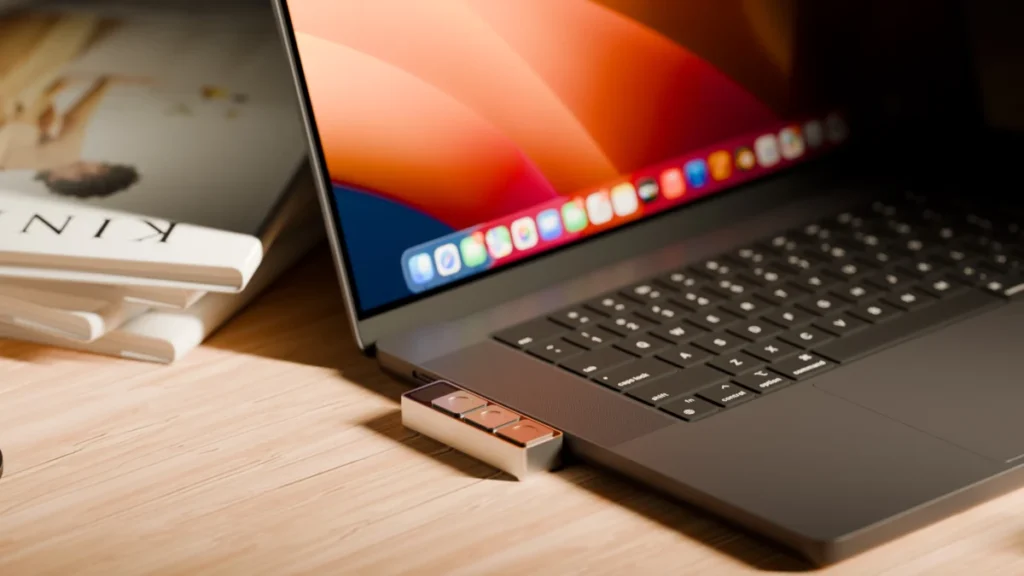
Enter Dune, a novel piece of hardware from startup Project Mirage. A diminutive, three-key aluminum keypad roughly the size of a stick of gum, Dune aims to solve the problem of fragmented keyboard shortcuts by offering a tactile, context-aware command center that attaches directly to your MacBook’s USB-C port.
The Core Concept: Tactile Efficiency
At its heart, Dune is designed to reduce cognitive load. By providing a physical interface for frequently used actions, it eliminates the need to memorize application-specific hotkeys. When connected, the device functions as a chameleon; it senses which application is active on your screen and adjusts its three keys accordingly.
In a video conferencing app, the buttons might default to "Toggle Mic," "Toggle Video," and "Bring Window to Front." Shift your attention to Microsoft Excel or Google Sheets, and the keys automatically remap to "Copy," "Paste," and "Undo." For web developers, the keys can be programmed to trigger GitHub actions like merging or closing pull requests within VS Code.
The device is meticulously engineered to fit flush against specific MacBook models, creating a seamless aesthetic that feels like a native extension of the hardware. Drawing power directly from the laptop’s port, it requires no external batteries or charging cables, maintaining the minimalist ethos of the Apple ecosystem.
A Chronology of the ‘Dune’ Development
The project, born from the frustration of its founders regarding fragmented software workflows, represents a shift toward "hardware-as-an-ecosystem."
- Early Conceptualization: The founders identified that while professional power users often turn to devices like Elgato’s Stream Deck, those solutions are often bulky, desk-bound, and require significant manual configuration.
- Prototyping Phase: The team focused on the "flush-fit" requirement, ensuring that the device would not be an obstructive peripheral but rather a secondary input device that stays out of the way.
- Software Integration: Unlike traditional macro pads that require complex software suites, the team prioritized ease of use, leading to the development of a companion app that leverages modern AI tools.
- Public Launch: The device recently entered the market for M2 Air or later and M1 Pro or later MacBook models running macOS 15 Sequoia or newer, positioning itself as a premium productivity tool for the Apple-centric workforce.
Supporting Data and Technical Specifications
Dune enters a competitive, albeit niche, market. While products like the MuteMe offer single-function utility for video calls, and the Stream Deck provides an expansive array of LCD-backed keys for broadcasters, Dune sits in the "goldilocks zone" of portability and versatility.
Key Specifications:
- Build Material: CNC-machined aluminum.
- Connectivity: USB-C (direct port integration).
- Compatibility: M2 Air/M1 Pro MacBooks and newer (macOS 15 Sequoia).
- Power: Bus-powered (zero battery footprint).
- Pricing: $119 (introductory pricing), eventually scaling to $149.
The companion software is where the device distinguishes itself. It does not merely allow for hard-coded macros; it integrates with Claude Desktop. This allows users to describe a task in plain English—such as "create a button that formats my current document as a PDF"—and the system generates the necessary script, effectively lowering the barrier to entry for non-technical users.
Implications: The Rise of AI-Assisted Hardware
The introduction of Dune signals a broader shift in how we interact with our computers. By using the device as a "thin front end" for an AI-powered skills ecosystem, Project Mirage is betting on a future where your hardware is only as good as the software skills you download to it.

The Power of the Marketplace
Project Mirage has implemented a marketplace within their app, allowing users to share, download, and iterate on "skills." If a user creates a clever shortcut to summarize a CRM page or automate an email response, that skill can be distributed to the entire community. This crowdsourcing element is crucial for the company’s retention strategy; as the ecosystem of skills grows, the device becomes exponentially more valuable to the user.
A New Workflow Paradigm
For professionals in high-velocity roles—investors, consultants, and developers—the ability to automate "micro-tasks" can save hours of cumulative time each week. One beta tester noted the ability to trigger a "Company Brief" shortcut: while viewing a startup’s website, a single tap retrieves the firm’s competitive landscape, investor data, and potential due-diligence questions. This is a leap forward from traditional productivity tools, moving from mere "button mapping" to "contextual intelligence."
The Path to Improvement: Critiques and Observations
Despite its promise, the hardware is not without its teething issues. Early user feedback—including reports from tech reviewers—has highlighted a need for better mechanical design regarding key resistance.
- Sensitivity Issues: Current iterations of the keys are highly sensitive. A simple reach for a coffee mug or a slight adjustment of the laptop can trigger an accidental mute or camera cut. Improving the actuation force is a necessary evolution for future hardware iterations.
- Testing Constraints: Currently, the companion app lacks a "sandbox" or "preview" mode. Users must commit a skill to a physical key to test it, which can be disruptive during a live workflow. A virtual testing environment would significantly improve the user experience.
- Proactive Curation: To prevent the marketplace from becoming a graveyard of low-quality scripts, Project Mirage must take an active role in curating and verifying community-built skills.
The Verdict: Is it Worth the Investment?
At its $119 entry price point, Dune is a compelling proposition for the productivity-obsessed. It occupies a space that is more sophisticated than a simple button, yet less intimidating than a full-scale macro deck.
For the average remote worker, it is a luxury. For the power user whose day is dictated by the rapid switching between dozens of browser tabs, terminal windows, and communication platforms, it is a game-changer. The device’s success will ultimately hinge on two factors: the reliability of the AI integration and the willingness of the developer community to populate the skill marketplace with genuinely useful, time-saving functions.
As we continue to push the boundaries of how we interact with our digital tools, Project Mirage has successfully identified that the most powerful interface is often the simplest one. By shrinking the command center to the size of a gum stick, they’ve made the promise of "ambient computing" feel a little more tangible. Whether you are a venture capitalist mapping out a competitor landscape or a software engineer pushing code to a repository, Dune offers a glimpse into a future where your computer works as fast as you think.
Final Thoughts on Market Positioning
The hardware market for "Mac-specific" peripherals has historically been dominated by high-end hubs and docking stations. By moving into the "workflow optimization" space, Project Mirage is carving out a new category. If they can refine the tactile experience of the keys and bolster their software marketplace, they are well-positioned to become a staple on the desks of the modern professional.
Disclaimer: This article contains affiliate links. Purchases made through these links may result in a small commission for the publisher, supporting our continued independent coverage of the tech industry.