Automating the Ledger: A Comprehensive Analysis of Tiller Money’s Spreadsheet-Based Financial Ecosystem
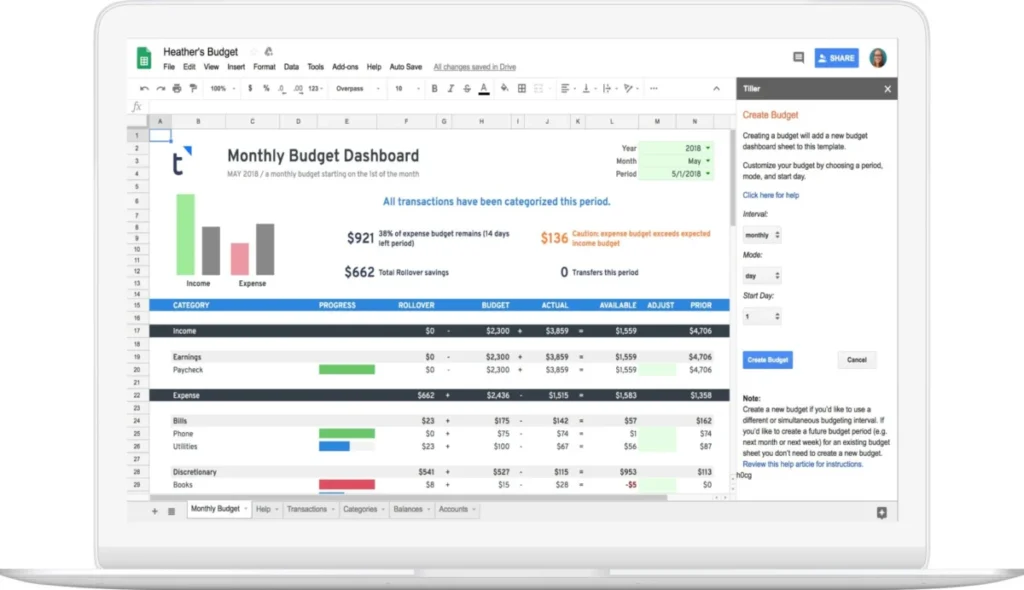
The intersection of personal finance and digital technology has yielded a vast array of proprietary budgeting applications, yet millions of individuals worldwide continue to rely on a decades-old tool: the spreadsheet. While modern software platforms offer sleek, automated interfaces, they often restrict user control, enforce rigid categorization structures, and limit data portability. Conversely, traditional spreadsheets offer unmatched flexibility but suffer from the friction of manual data entry, complex template design, and a lack of real-time analytical tools.
Tiller Money addresses this operational gap. By bridging the automated data retrieval capabilities of modern financial technology with the customizable environment of Google Sheets and Microsoft Excel, Tiller has established a distinct niche in the personal finance ecosystem. This analysis provides an in-depth evaluation of Tiller Money, examining its core operational mechanics, setup workflows, feature sets, security frameworks, and broader implications for the future of personal wealth management.
1. Main Facts: The Core Value Proposition of Tiller Money
Tiller Money is a financial software-as-a-service (SaaS) utility designed to automate the flow of daily transaction and balance data from financial institutions directly into user-controlled spreadsheets. Unlike closed-loop budgeting platforms, Tiller does not force users into a proprietary dashboard. Instead, it serves as a data pipeline, populating Google Sheets and Microsoft Excel with organized, bank-verified data.
+--------------------------+      +----------------------+      +--------------------------+
|  Financial Institutions  | ---> | Tiller Data Pipeline | ---> |   Google Sheets / Excel  |
| (Banks, Cards, Investing)|      | (Yodlee Integration) |      |  (Foundation Template)   |
+--------------------------+      +----------------------+      +--------------------------+
The Three Core Challenges of Spreadsheet Budgeting
For financial analysts and household managers who prefer spreadsheets, three persistent challenges have historically limited efficiency:
- The Data Entry Bottleneck: Manually downloading CSV files from multiple banking portals and importing them into a master sheet is labor-intensive and prone to omission errors.
- Template Design Overhead: Building a comprehensive ledger that tracks budgets, net worth, investment performance, and tax liabilities requires advanced spreadsheet design skills.
- Analytical Limitations: Creating dynamic charts, debt payoff models, and forecasting calculators requires continuous formula maintenance.
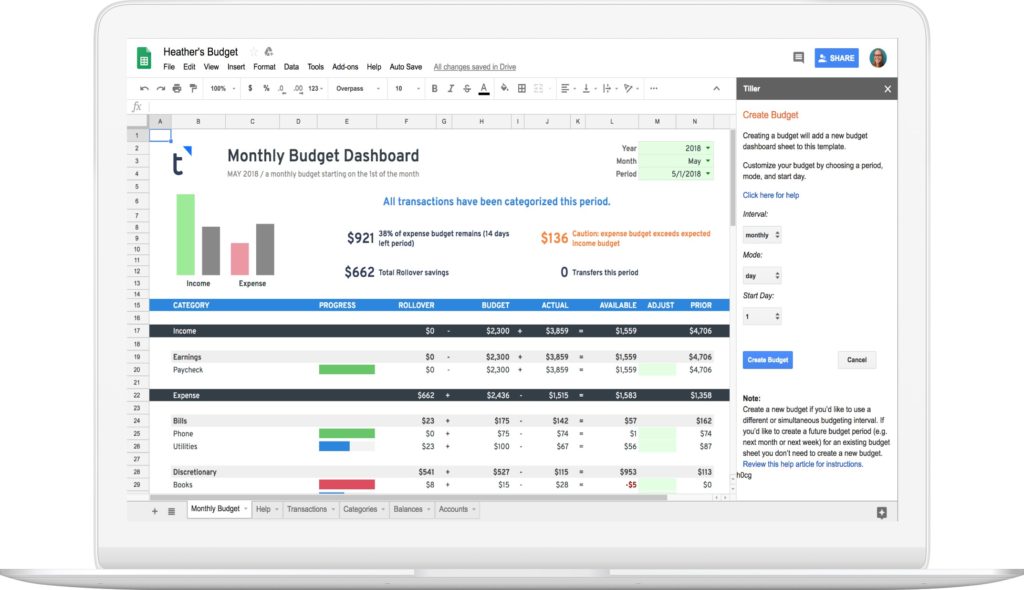
Tiller resolves these issues by acting as an automated data bridge. Once linked, transaction histories and account balances update daily. The platform provides a structured starting point called the Tiller Foundation Template, alongside a modular suite of analytical tools via specialized add-ons, positioning itself as a highly flexible alternative to legacy platforms like Quicken.
2. Chronology: Onboarding, Evolution, and Deployment Workflow
Understanding Tiller’s operational flow requires analyzing how a user transitions from raw account connection to a fully customized financial dashboard.

Step 1: Account Aggregation and Authentication
The user begins by establishing a Tiller account and linking their external financial institutions. Using a secure pop-up portal, the user searches for their banks, credit card issuers, and investment brokerages.
Tiller’s architecture separates account connection from spreadsheet linkage. This design allows users to direct specific accounts to distinct sheets. For example, a user can channel personal accounts to a household budget sheet, business accounts to a sole-proprietorship ledger, and brokerage accounts to an investment tracker.
                          +---> Personal Budget Spreadsheet (Sheet 1)
                          |
Connected Financial Accs -+---> Small Business Ledger (Sheet 2)
                          |
                          +---> Net Worth & Investment Tracker (Sheet 3)
Step 2: Deploying the Foundation Template
After linking accounts, the user launches the Tiller Foundation Template within Google Sheets or Microsoft Excel. This step requires authorizing the Tiller add-on to interact with the spreadsheet.
Initially, the newly opened template contains no transaction data. This design choice prevents accidental data mixing across multiple spreadsheets, allowing users to build up to five separate sheets under a single subscription.
Step 3: Activating the Data Feed
To populate the spreadsheet, the user opens the sidebar add-on, selects the active sheet, and links the desired financial accounts. The system then runs its initial data fetch, pulling historical transactions (typically up to 90 days) and current balances into structured tabs:
- Transactions Tab: A unified ledger displaying dates, descriptions, amounts, account names, and institution origins.
- Balances Tab: A real-time record of asset and liability balances, which serves as the data source for net worth tracking.
- Categories Tab: A customization sheet where users define their income and expense categories, grouping them to align with their chosen budgeting methodology.
3. Supporting Data and Feature Analysis
Tiller’s utility is driven by its modular feature set, powered by two primary engines: Tiller Money Feeds and Tiller Money Labs.

Tiller Money Feeds and the AutoCat Engine
Manual categorization remains a major bottleneck in personal budgeting. Tiller addresses this through AutoCat (Automatic Categorization), a rule-based engine built into the Tiller Money Feeds add-on.
| Feature Component | Operational Mechanism | User Benefit |
|---|---|---|
| Keyword Matching | Triggers categories based on specific text strings (e.g., "Starbucks" mapped to "Coffee"). | Eliminates repetitive manual sorting. |
| Advanced Filtering | Utilizes exact matches, account-specific rules, or transaction amount thresholds. | Supports complex separation of business and personal expenses. |
| Batch Processing | Allows users to run rules retroactively over thousands of imported rows. | Ensures historical data accuracy during initial setup. |
Tiller Money Labs: The Modular Add-on Suite
For advanced users, the Tiller Money Labs add-on offers an extensive repository of community-tested and developer-supported templates.
Tiller Money Labs Add-on Suite
 ├── Split Transactions (Divides single receipts across multiple categories)
 ├── Net Worth Dashboard (Tracks assets vs. liabilities over a rolling 12-month window)
 ├── Debt Planner (Generates payoff schedules using Debt Snowball or Avalanche methods)
 ├── Bill Payment Tracker (Monitors recurring fixed liabilities and payment schedules)
└── Retirement & FIRE Planner (Projects investment values based on variable growth scenarios)- Split Transactions: This tool automates the process of dividing a single transaction (such as a large retail purchase) across multiple budget categories.
- Net Worth Dashboard: Generates dynamic charts tracking asset-to-liability ratios over rolling 12-month periods.
- Debt Planner: Helps users design payoff schedules using Debt Snowball or Debt Avalanche methodologies, calculating exact debt-free dates based on extra monthly payments.
- Retirement & FIRE Planner: Built specifically for the Financial Independence, Retire Early (FIRE) community, this tool projects investment growth over decades, allowing users to test variable compound interest rates in real-time.
Comparative Cost-Benefit Analysis
Tiller operates on a subscription model of $79 per year, following a 30-day free trial. The table below compares Tiller with other prominent wealth-management tools:
| Feature | Tiller Money | Empower (Personal Capital) | Quicken Classic |
|---|---|---|---|
| Annual Cost | $79/year | Free | $48 – $120+/year |
| Primary Interface | Google Sheets / Excel | Proprietary Web/Mobile App | Desktop Software (Mac/Windows) |
| Data Control | Absolute (User owns the sheet) | Restricted to platform exports | Local database files |
| Customizability | Unlimited (Full formula access) | Low (Fixed categories) | Moderate |
| Ideal For | Spreadsheet enthusiasts, FIRE, Small Businesses | Investment tracking & Net Worth | Traditional offline budgeting |
4. Official Security, Privacy, and Compliance Frameworks
Given the sensitivity of linking primary bank accounts to cloud-based spreadsheets, Tiller’s security protocols are a critical component of its platform.
+-----------------------------------------------------------------+
|                    Security Layer Breakdown                     |
+-----------------------------------------------------------------+
|  1. Bank-Grade Encryption: 256-bit AES protection in transit.    |
|  2. Tokenized Access: Yodlee integration prevents credential     |
|     storage on Tiller servers.                                  |
|  3. Read-Only Architecture: Zero transaction capability; money   |
|     cannot be moved or withdrawn.                               |
|  4. Two-Factor Authentication (2FA): Required for login.        |
+-----------------------------------------------------------------+
Data Aggregation via Yodlee
Tiller does not directly collect, view, or store user banking credentials. Instead, it accesses financial data via Envestnet Yodlee, a leading financial data aggregation platform utilized by nine of the fifteen largest financial institutions in the United States. When a user logs into their bank through Tiller, Yodlee establishes a secure, tokenized connection, passing read-only transaction and balance data back to Tiller’s systems.
Cryptographic and Operational Safeguards
- AES-256 Encryption: All data transmitted between financial institutions, Tiller, and Google/Microsoft servers is protected using bank-grade 256-bit Advanced Encryption Standard (AES) protocols.
- Read-Only Restriction: Tiller’s access token is strictly read-only. The software cannot initiate transfers, pay bills, or modify accounts.
- Two-Factor Authentication (2FA): Tiller supports and enforces multi-factor authentication protocols to prevent unauthorized access to the user dashboard.
- Data Sovereignty: Tiller’s privacy policy states that the company does not sell user financial data or monetize user behavior through targeted advertising. Additionally, Tiller personnel cannot view a user’s spreadsheet data unless explicitly granted access by the user for technical troubleshooting.
5. Implications: Data Sovereignty and the Future of Wealth Management
The growing popularity of platforms like Tiller reflects a broader shift in consumer technology toward data sovereignty—the principle that individuals should maintain absolute ownership and control over their digital information.
The Demise of Legacy Platforms
The personal finance landscape changed significantly with the closure of Intuit Mint in early 2024. For over a decade, Mint was a dominant player in free, automated budgeting. Its retirement highlighted a major risk of proprietary, ad-supported personal finance software: users are vulnerable to corporate strategy shifts, platform shutdowns, and sudden data loss.
When a proprietary app shuts down, users often lose years of historical transaction data or are forced to migrate to alternative closed-loop platforms. Tiller’s spreadsheet-centric model addresses this vulnerability. Because transaction data is written directly to a standard Google Sheet or Excel workbook, the user retains their entire financial history in a universal format, independent of Tiller’s long-term business continuity.
The Rise of Hyper-Customization and FIRE
Standard budgeting applications often use rigid categorization structures that fail to capture complex financial lives, such as those of freelancers, real estate investors, or small business owners. Tiller’s open-ended model allows users to design highly customized workflows, such as:
- Integrating the 50/30/20 budgeting rule directly into automated pivot tables.
- Consolidating personal expenses alongside sole-proprietor business ledgers to simplify quarterly tax planning.
- Modeling complex tax-loss harvesting scenarios within self-designed investment dashboards.
By automating data retrieval while keeping the user interface open-ended, Tiller has become a valuable tool for the modern, data-driven personal finance community. It offers a practical compromise between manual data entry and rigid, proprietary platforms, helping users maintain complete control over their financial data.