The Automated Spreadsheet Revolution: A Comprehensive Analysis of Tiller Money’s Financial Tracking Platform
In an era dominated by proprietary, closed-loop financial applications that often monetize user data or push targeted advertisements, a growing segment of consumers is returning to a classic tool for personal finance management: the spreadsheet. While spreadsheets offer unmatched customization and data control, they have historically suffered from a significant drawback—the tedious requirement of manual data entry.
Tiller Money, a prominent fintech platform founded in 2015, addresses this specific bottleneck. By establishing a secure bridge between a user’s financial institutions and cloud-based spreadsheet platforms like Google Sheets and Microsoft Excel, Tiller automates the data ingestion process. This review and system analysis explores how Tiller Money operates, its structural features, security protocols, market positioning, and its broader implications for personal financial management.
Main Facts: What is Tiller Money?
Tiller Money is a subscription-based financial technology service that automatically aggregates transaction and balance data from a user’s bank accounts, credit cards, and investment portfolios, and feeds that data directly into Google Sheets or Microsoft Excel.
Unlike traditional personal finance tools like Mint (now defunct), Monarch Money, or Empower, which restrict users to proprietary dashboards, Tiller treats the spreadsheet as the primary user interface.
Core Value Propositions
- Automated Data Pipelines: Tiller eliminates manual CSV imports and manual entry by updating connected spreadsheets daily with cleared transaction data and account balances.
- Platform Flexibility: The service supports both Google Sheets and Microsoft Excel, allowing users to leverage the unique formulas, scripting environments, and charting capabilities of their preferred platform.
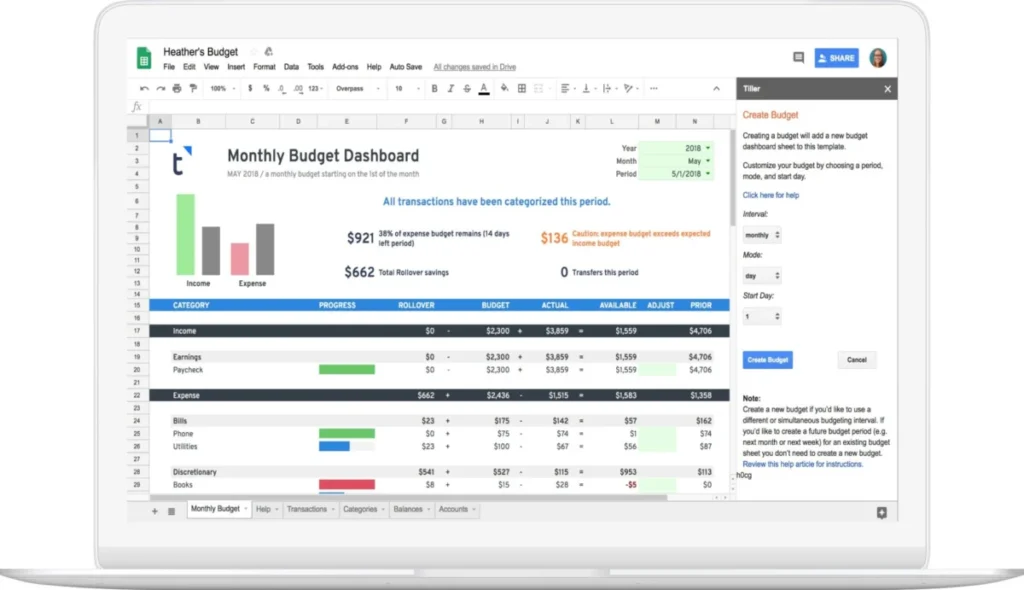
- The Foundation Template: To prevent users from having to build financial models from scratch, Tiller provides a highly optimized starter template that includes pre-configured dashboards for budgeting, net worth tracking, and expense categorization.
- Multi-Spreadsheet Architecture: Users can connect a single Tiller account to up to five distinct spreadsheets, enabling segregated tracking for personal budgets, business expenses, investment portfolios, or estate management.
Chronology: From Initialization to Daily Operation
To understand how Tiller Money functions within a user’s financial workflow, it is helpful to trace the chronological path of deploying the software, from the initial setup to daily automation.
[Financial Institutions]
       │ (Checking, Savings, Credit Cards, Investments)
       ▼
   [Yodlee] (Bank-Level Secure Aggregation API)
       │
       ▼
 [Tiller Console] (User authorizes specific accounts)
       │
       ▼
 [Tiller Money Feeds Add-on] (Pushes read-only data)
       │
 ┌─────┴─────────────────────────────────────┐
 ▼                                           ▼
[Google Sheets]                            [Microsoft Excel]
 ├─ Transactions Tab                        ├─ Transactions Tab
 ├─ Balance History                         ├─ Balance History
 └─ Foundation Template Dashboards          └─ Foundation Template Dashboards
Phase 1: Account Aggregation and Consolidating Data
The process begins when a user registers on the Tiller platform and connects their financial institutions. Rather than building proprietary connectors for thousands of banks, Tiller utilizes Yodlee, an industry-standard financial data aggregator used by major retail banks.
During this phase, the user logs into their accounts via a secure portal. Tiller does not see or store these credentials. Once authorized, the data aggregator establishes a read-only pipeline that extracts daily balances and transaction histories.

Phase 2: Template Deployment
After account aggregation, the user instantiates the Tiller Foundation Template within Google Drive or Microsoft OneDrive.
- The user installs the Tiller Money Feeds add-on/extension.
- The user links the specific spreadsheet to their Tiller account.
- The user selects which of the aggregated accounts should feed data into this specific sheet.
This architectural decision is crucial: connecting accounts to Tiller does not automatically dump all data into every spreadsheet. It gives users the granular control to route business card transactions to a business ledger and personal accounts to a family budget sheet.
Phase 3: Automated Daily Ingestion
Once configured, the system operates on a 24-hour refresh cycle. Every day, Tiller retrieves updated transaction data and balance snapshots from the connected institutions. When the user opens their spreadsheet, the Tiller Money Feeds add-on executes a sync, appending new transactions to the bottom of the Transactions sheet and updating the Balance History ledger.
Supporting Data: Feature Breakdown and Technical Architecture
Tiller’s utility is driven by its modular features and its pricing model, which sets it apart from both free ad-supported apps and expensive enterprise accounting software.
Key Technical Features
| Feature | Technical Implementation | Practical Utility |
|---|---|---|
| Tiller Money Feeds | API-driven sidebar add-on | Controls the link between the spreadsheet and the Tiller database; triggers manual or scheduled data refreshes. |
| AutoCat (Automatic Categorization) | Regex and keyword-matching engine | Automatically assigns categories (e.g., "Dining Out") to transactions based on merchant descriptions (e.g., "Starbucks") using user-defined rules. |
| Split Transactions Tool | Add-on utility macro | Simplifies dividing a single transaction (e.g., a $200 Target receipt) across multiple budget categories (e.g., $150 Groceries, $50 Household Supplies). |
| Tiller Money Labs | Community-driven template repository | Provides experimental, highly specialized add-ons, including debt snowball planners, bill payment trackers, and FIRE (Financial Independence, Retire Early) retirement calculators. |
The Budgeting Architecture: The 50/30/20 Example
Because Tiller relies on open spreadsheets, users are not forced into a rigid budgeting philosophy. In the Categories tab of the Foundation Template, users define their own categories and assign them to custom groups.
For instance, a user implementing a strict 50/30/20 budget can structure their entire spreadsheet around three primary groups:
- Needs (50%): Housing, utilities, groceries, insurance.
- Wants (30%): Dining out, entertainment, travel.
- Savings/Debt (20%): Retirement contributions, principal debt payments.
As AutoCat classifies incoming transactions, the Monthly Budget and Yearly Budget dashboards dynamically update, rendering live visualizations of spending against these macro targets without requiring the user to write complex SUMIFS formulas.

Cost and Market Position
Tiller Money operates on a transparent, flat-rate pricing model:
- Trial Period: 30-day fully functional free trial.
- Annual Subscription: $79 per year (equivalent to approximately $6.58 per month).
Unlike many of its competitors, Tiller does not offer a free tier supported by financial product recommendations or credit card advertisements. This paid model aligns the company’s financial incentives with user privacy.
Security Standards and Data Governance
When managing personal financial data in a cloud environment, security is a paramount concern. Tiller Money employs a multi-layered security framework designed to minimize attack surfaces and protect sensitive user data.
       [User Credentials] (Protected by 2FA)
               │
               ▼
   [Tiller Security Layers]
   ├── AES-256 Encryption (Data at rest and in transit)
   ├── Read-Only API Restrictions (No money-moving capabilities)
   └── Yodlee Bank-Level Tokenization (No credentials stored by Tiller)
1. Read-Only Access
Tiller’s access to connected financial institutions is strictly read-only. The platform has no capability to execute transfers, initiate bill payments, or alter account settings. Even if a user’s Tiller account were compromised, the attacker would have no mechanism to access or move funds.
2. Credential Protection via Tokenization
Tiller never sees, stores, or transmits bank login credentials. All account aggregation is handled via Yodlee, which uses secure OAuth tokens where supported by financial institutions. When multi-factor authentication (MFA) or two-factor authentication (2FA) is enabled on a bank account, the authentication prompt is passed directly to the user through the secure aggregator portal, maintaining end-to-end security.
3. Encryption and Privacy
- Data Transit: All communication between bank servers, Tiller databases, and Google/Microsoft APIs is encrypted using industry-standard Transport Layer Security (TLS).
- Data at Rest: Data stored within Tiller’s secure database is protected with 256-bit Advanced Encryption Standard (AES) encryption.
- Zero-Knowledge Ethos: Tiller staff do not view a user’s spreadsheet data unless explicitly authorized by the user for troubleshooting or customer support purposes.
Implications: The Shift Toward Financial Sovereignty
The rise of platforms like Tiller Money highlights a broader shift in the personal finance space: the movement toward financial data sovereignty.
1. Moving Away from Proprietary "Walled Gardens"
Traditional budgeting apps lock users into proprietary ecosystems. If an app updates its interface, changes its algorithm, or goes out of business (as was the case with the widely used Mint platform), users risk losing years of historical spending data.
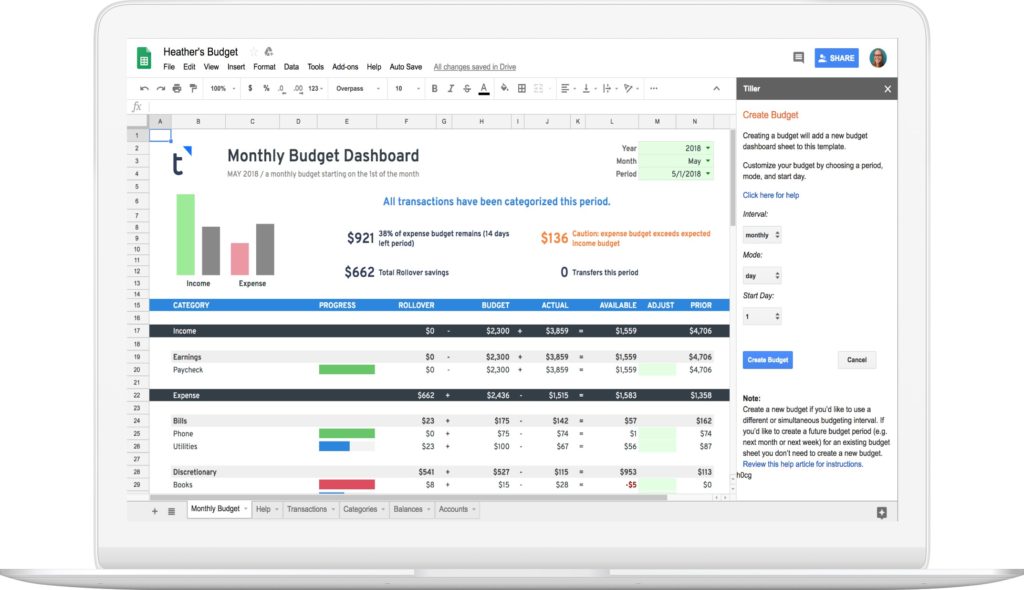
By centering the user experience on standard spreadsheet files (.xlsx or Google Sheets), Tiller ensures that the user retains absolute ownership of their historical financial data. If a user decides to cancel their Tiller subscription, they keep their spreadsheets, complete with all historical transactions and custom dashboards; the automated daily feed simply pauses.
2. Customization and the FIRE Movement
The FIRE (Financial Independence, Retire Early) community and advanced financial planners often find mainstream applications inadequate. These users require complex forecasting models that incorporate fluctuating investment yields, real estate depreciation, and tax-deferred account projections.
Tiller’s open-ended architecture allows these power users to build highly customized sheets, linking automated transactional data directly to advanced retirement projection models without the manual labor of data entry.
3. The Future of Spreadsheet-Based Fintech
As open banking APIs continue to mature in the United States and Europe, services like Tiller are poised to become more reliable and faster. The transition away from legacy screen-scraping methods toward official bank APIs reduces connection breakages and improves data fidelity.
Tiller Money demonstrates that the humble spreadsheet—when paired with modern data aggregation technology—remains one of the most powerful, flexible, and secure tools available for personal and small business financial management.