Bridging the Gap Between Automation and Customization: An Analytical Review of Tiller Money and the Future of Spreadsheet-Based Financial Management
In an era dominated by slick, proprietary personal finance applications, a growing cohort of consumers is turning back to a classic tool: the spreadsheet. While modern platforms offer automated tracking, they often restrict users to rigid, pre-defined interfaces and black-box algorithms. Conversely, traditional spreadsheets offer unmatched customization but require tedious, error-prone manual data entry.
Tiller Money has emerged as a prominent bridge between these two worlds. By automatically feeding real-time financial transaction data and account balances directly into Google Sheets and Microsoft Excel, Tiller aims to combine the automation of modern financial technology with the absolute control of a personal spreadsheet. This review and analysis explores how Tiller Money works, its core features, security protocols, and its broader implications for the personal finance management (PFM) industry.
1. Main Facts: The Hybrid Approach to Personal Finance
Tiller Money’s core value proposition rests on solving the three fundamental pain points of traditional spreadsheet budgeting:
- The Manual Entry Burden: Historically, keeping a spreadsheet budget required manually downloading CSV files from various banking portals or entering transactions one by one—a process prone to human error and neglect.
- The Lack of Structure: Building a comprehensive budget, net worth tracker, and investment dashboard from scratch requires advanced spreadsheet skills that many users lack.
- Analytical Complexity: Generating dynamic charts, trend lines, and predictive financial models requires complex formulas that can easily break.
Tiller addresses these challenges by acting as a secure data pipeline. Rather than forcing users into a proprietary app interface, Tiller connects directly to user-authorized financial institutions and deposits clean, structured transaction data and daily balances directly into Google Sheets or Microsoft Excel.
Once the data is imported, users can utilize Tiller’s pre-built templates or construct their own formulas, charts, and dashboards. This approach grants users total ownership of their financial data, free from the advertising and cross-selling common in free budgeting applications.
2. Chronology: From Manual Ledgers to Automated Feeds
To understand Tiller Money’s place in the market, it is helpful to look at the evolution of personal finance software and the user onboarding journey.

+-----------------------------------------------------------------+
|                      The Evolution of PFM                       |
+-----------------------------------------------------------------+
|  1. Manual Spreadsheets (Excel/Lotus 1-2-3)                      |
|     - High customization, but high manual labor.                |
+-----------------------------------------------------------------+
|  2. Proprietary Web Apps (Mint, Quicken)                        |
|     - Automatic feeds, but rigid UI and data monetization.       |
+-----------------------------------------------------------------+
|  3. Automated Spreadsheets (Tiller Money)                       |
|     - Automatic feeds combined with open-canvas customization.   |
+-----------------------------------------------------------------+
The Onboarding and Execution Workflow
For a new user, the process of transitioning from a static spreadsheet to an automated Tiller sheet follows a structured timeline:
- Step 1: Account Aggregation: The user signs up for Tiller and connects their financial accounts—including checking, savings, credit cards, loans, and investment portfolios.
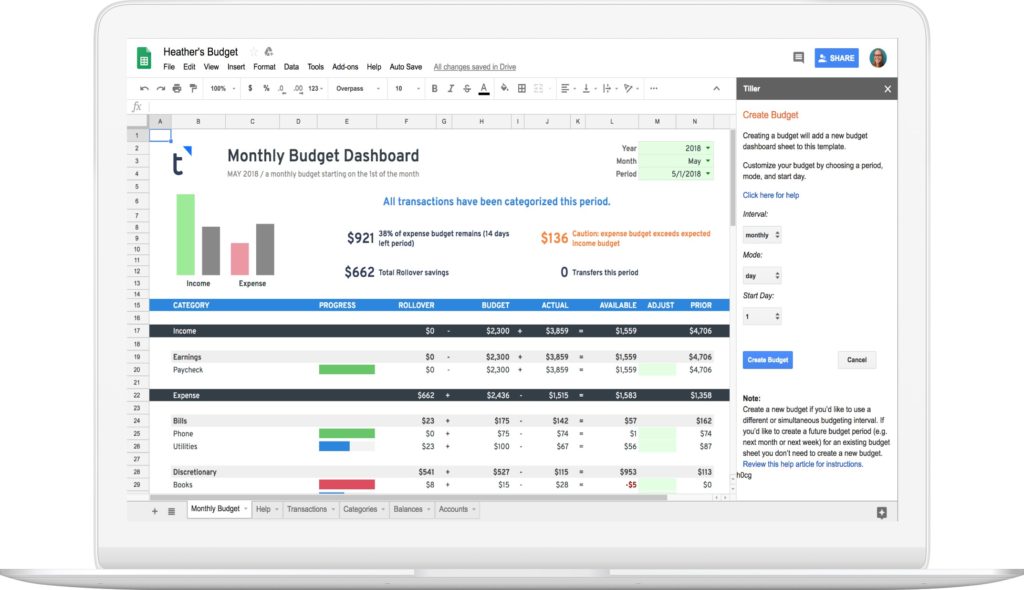
- Step 2: Template Deployment: The user provisions a new spreadsheet using the Tiller Foundation Template via Google Sheets or Microsoft Excel. This template serves as the analytical foundation, pre-populated with dashboards, transaction ledgers, and budget calculators.
- Step 3: Establishing the Data Link: Crucially, connecting accounts to Tiller does not automatically flood every spreadsheet with data. Users must explicitly link specific financial institutions to specific spreadsheets (up to five separate sheets per subscription). This design allows users to maintain separate spreadsheets for different purposes—such as one for personal budgeting, one for business expenses, and another dedicated solely to tracking long-term investment portfolios.
- Step 4: Continuous Automation: Every day, Tiller’s background feeds fetch new transactions and updated balances, ensuring the spreadsheet is accurate and ready for analysis without requiring manual downloads.
3. Supporting Data: Feature Breakdown and Cost-Benefit Analysis
Tiller’s utility is driven by its modular ecosystem, which is divided into core templates, feed engines, and community-driven add-ons.
The Foundation Template
The Tiller Foundation Template is the starting point for most users. It contains several core tabs:
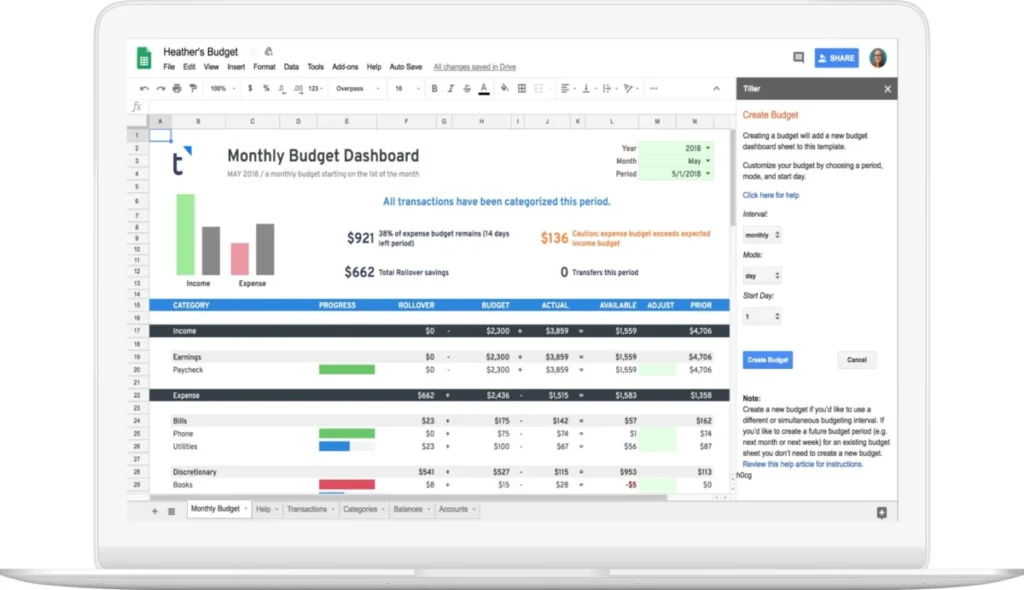
- Insights Tab: A high-level financial dashboard summarizing current balances, recent spending, and budget progress.
- Transactions Tab: The central repository where all automated transaction data is deposited. Each row contains standardized metadata, including date, description, amount, institution, and account number.
- Categories Tab: A customizable sheet where users define their income and expense categories, group them (e.g., housing, discretionary, savings), and assign monthly budgets.
- Monthly & Yearly Budget Tabs: Dynamic summaries that compare actual spending against budgeted targets, automatically updating as transactions are categorized.
+-------------------------------------------------------------+
|               Tiller Foundation Template Flow               |
+-------------------------------------------------------------+
|                                                             |
|  [ Bank Feeds ] ---> [ Transactions Tab ]                   |
|                              |                              |
|                              v                              |
|                     [ AutoCat Engine ]                      |
|                              |                              |
|                              v                              |
|  [ Categories ] ---> [ Monthly/Yearly Budgets ]             |
|                              |                              |
|                              v                              |
|                     [ Insights Dashboard ]                  |
|                                                             |
+-------------------------------------------------------------+
Advanced Functionality via Add-Ons
To expand the capabilities of basic spreadsheets, Tiller offers two primary Google Sheets add-ons:
1. Tiller Money Feeds & AutoCat
The Tiller Money Feeds add-on manages the data pipeline. Its most powerful feature is AutoCat (Automatic Categorization). AutoCat allows users to build custom rules based on transaction descriptions, merchant names, or accounts. For example, a rule can dictate that any transaction containing "Starbucks" or "Peet’s" be automatically categorized under "Coffee." Over time, this automation can correctly categorize over 90% of recurring household transactions.
2. Tiller Money Labs
For power users, Tiller Money Labs provides an experimental library of community-supported templates and tools. Key tools include:

- Split Transactions: A guided utility that allows users to easily split a single transaction (such as a large Target or Costco receipt) across multiple categories.
- Net Worth Dashboard: A tracker that visualizes asset and liability trends over rolling 12-month periods, offering a clear view of wealth accumulation.
- Debt Planner: A calculator designed to model debt payoff strategies, such as the debt snowball or debt avalanche methods, using live liability balances.
- FIRE Retirement Planner: A tool designed for the "Financial Independence, Retire Early" community, projecting investment growth and safe withdrawal rates based on current savings rates.
Subscription Pricing and Value Comparison
Tiller operates on a subscription model, offering a 30-day free trial followed by an annual fee of $79.
Unlike free financial tools that monetize user data by displaying targeted credit card ads, Tiller’s paid model aligns its incentives with user privacy. When compared to traditional software like Quicken or modern subscription competitors like Monarch Money or Copilot, Tiller presents a highly competitive price point—especially for those who value the unlimited scalability of a spreadsheet over a closed app.
4. Security Protocols and Data Governance
A primary concern for any automated financial tool is the security of bank credentials and sensitive financial data. Tiller addresses these concerns through a read-only architecture and industry-standard encryption protocols.
+--------------------------------------------------------------------------+
|                     Tiller Security Architecture                         |
+--------------------------------------------------------------------------+
|  User's Bank <==[Yodlee Aggregator]==> Tiller Database ==> Google/Excel  |
|  (Read-Only)      (Tokenized Auth)       (AES-256)         (User-Owned)  |
+--------------------------------------------------------------------------+
The Read-Only Data Pipeline
Tiller utilizes Yodlee, a financial data aggregator trusted by nine of the fifteen largest financial institutions in the United States.
- Credential Isolation: Tiller never sees, stores, or has access to users’ bank login credentials. Authentication is handled securely through Yodlee or via direct OAuth API integrations with major banks.
- No Transaction Capabilities: The data link is strictly read-only. It is technically impossible for Tiller, or anyone with access to the spreadsheet, to move funds, initiate transfers, or execute trades.
- Encryption Standards: All data in transit and at rest is protected using bank-grade 256-bit AES encryption. Multi-factor authentication (MFA) is supported and enforced during the account linking process.
Data Privacy and Ownership
Unlike mainstream PFM tools that aggregate and sell anonymous consumer spending data to market research firms, Tiller’s business model relies entirely on subscription fees. The company’s privacy policy states that user financial data is private and will never be sold or shared with third parties. Furthermore, because the data is deposited directly into Google Drive or Microsoft OneDrive, the user retains ultimate ownership and control of their historical financial records.
5. Implications: The Rise of "Data-First" Personal Finance
The success of Tiller Money highlights a broader shift in consumer technology: the transition from closed software ecosystems to open, user-controlled data models.
The Impact of Legacy Platform Sunsetting
The PFM landscape was recently disrupted by Intuit’s decision to shut down Mint, one of the pioneer free budgeting apps. Mint’s closure forced millions of users to migrate to other platforms, highlighting the risks of relying on proprietary, ad-supported software. Many displaced users realized that when a closed platform shuts down, years of historical categorization and custom data can be lost.
Tiller’s model insulates users from this risk. Because the data resides in standard Google Sheets or Excel files, users can export, back up, and preserve their financial history indefinitely, independent of Tiller’s servers.
The Customization Advantage
Every household has a unique financial structure. Rigid apps often struggle to accommodate edge cases, such as tracking business expenses alongside personal budgets, managing rental property cash flows, or calculating complex investment asset allocations.
By delivering clean data directly to a spreadsheet, Tiller empowers users to build bespoke financial models. A user can easily integrate advanced formulas, build pivot tables, and connect external data visualization tools like Google Looker Studio or Microsoft Power BI.
Conclusion
Tiller Money is not a one-size-fits-all solution. For consumers who prefer a passive, hands-off mobile app experience, the initial setup and spreadsheet interface may feel daunting. However, for spreadsheet enthusiasts, small business owners, and detail-oriented investors, Tiller offers a powerful combination of automation and flexibility. By eliminating manual data entry while preserving the open canvas of the spreadsheet, Tiller remains a premier tool for custom financial management.